Last updated: September 2026.
A Looker Studio template is a ready-made report. The pages, charts, filters and styling are already built, and you connect your own data (GA4, Google Ads, Search Console and so on) instead of starting from a blank canvas. Copy it, connect your account, and the charts fill with your numbers.
This guide is for marketers and agencies choosing a template for a specific job. It covers the 10 we would look at first by use case (free and paid), how to judge one, and how to copy one and connect your data.
A note on the name: Google renamed Looker Studio back to Data Studio in April 2026 (Google Cloud announcement). Most people still search for “Looker Studio templates”, so this guide uses that name. Everything here applies to Data Studio, and existing reports and templates carried over unchanged.
Quick picks: the best Looker Studio templates by use case
| Use case | Data source it needs | Free starting point | Beast Metrics option |
|---|---|---|---|
| Website (lead gen, B2B, content) | GA4 (Google connector) | Official Google Analytics template | GA4 Template (Non-Ecommerce) |
| Ecommerce | GA4 with ecommerce events | Vendor Shopify and WooCommerce dashboards | GA4 Template (Ecommerce) |
| SEO | Search Console (Google connector) | Official Search Console template | All-in-One Search Console Template |
| Google Ads | Google Ads (Google connector) | Official Google Ads template | Google Ads Template |
| Meta (Facebook and Instagram) Ads | Meta Ads (partner connector) | Connector vendor galleries | Meta Ads Template |
| Cross-channel paid media | Partner connectors per platform | Connector vendor galleries | None (usually a custom build) |
| All-in-one website | GA4, Search Console, Google Ads | Combine official templates yourself | Ultimate Website Dashboard |
| Local SEO | Business Profile (partner connector) | Connector vendor galleries | Google Business Profile Template |
| YouTube | YouTube Analytics (Google connector) | Official YouTube Analytics template | None |
| Lead gen and CRM | GA4 plus a CRM connector | Connector vendor galleries | None (start with GA4 Non-Ecommerce) |
What is a Looker Studio template?
A template is simply a report someone built and shared. Google’s documentation says any report can be used as a template: you make a copy and choose which data sources the copy uses (Google: Copy a report). Copying never duplicates the original data sources, so your copy shows your numbers, not the author’s.
There are three kinds:
- Official Google templates: free, built on Google’s own connectors (Google Analytics, Google Ads, Search Console, YouTube Analytics, Sheets, BigQuery), and fairly basic.
- Connector vendor templates: free templates from companies that sell data connectors, such as Windsor.ai, Dataslayer, Catchr, Coupler.io and Porter Metrics. They are built around the connector you need for non-Google data like Meta Ads.
- Paid templates: fuller reports from specialist builders, including us, with more pages, pre-built filters and client-ready styling.
The 10 best Looker Studio templates for marketers, by use case
Each entry covers what the template tracks, who it suits, the data source it needs, and the free and paid options. We sell some of these and say so. Where a free official template does the job, we say that too.
1. GA4 website dashboard (lead gen and non-ecommerce sites)
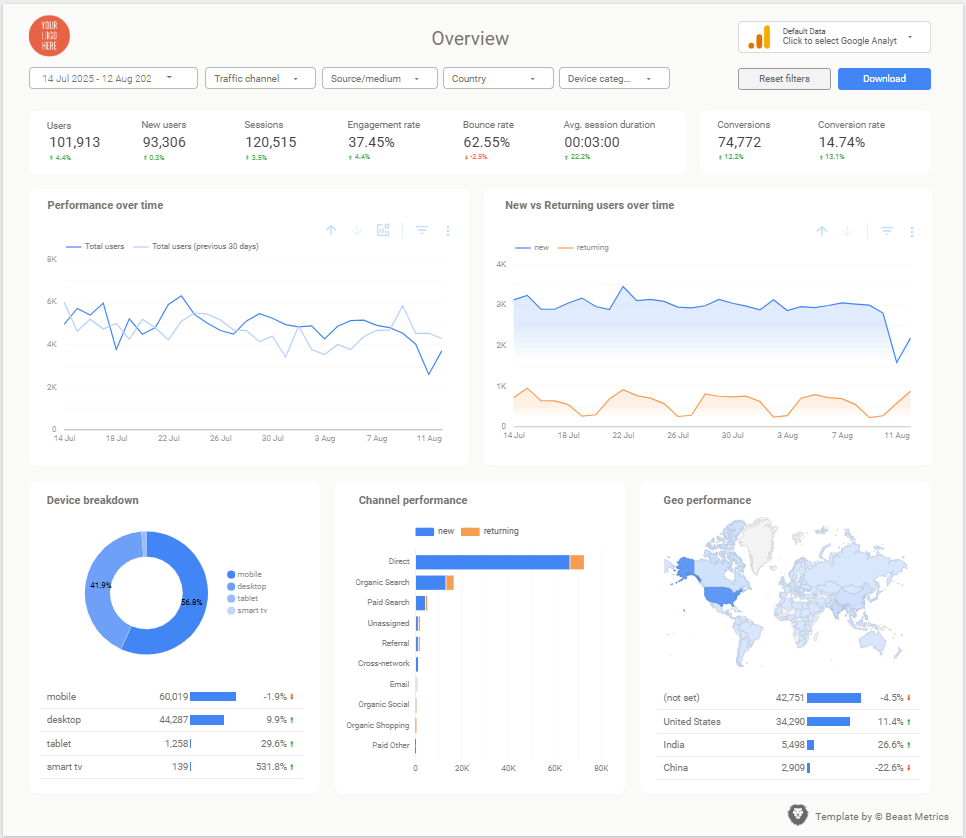
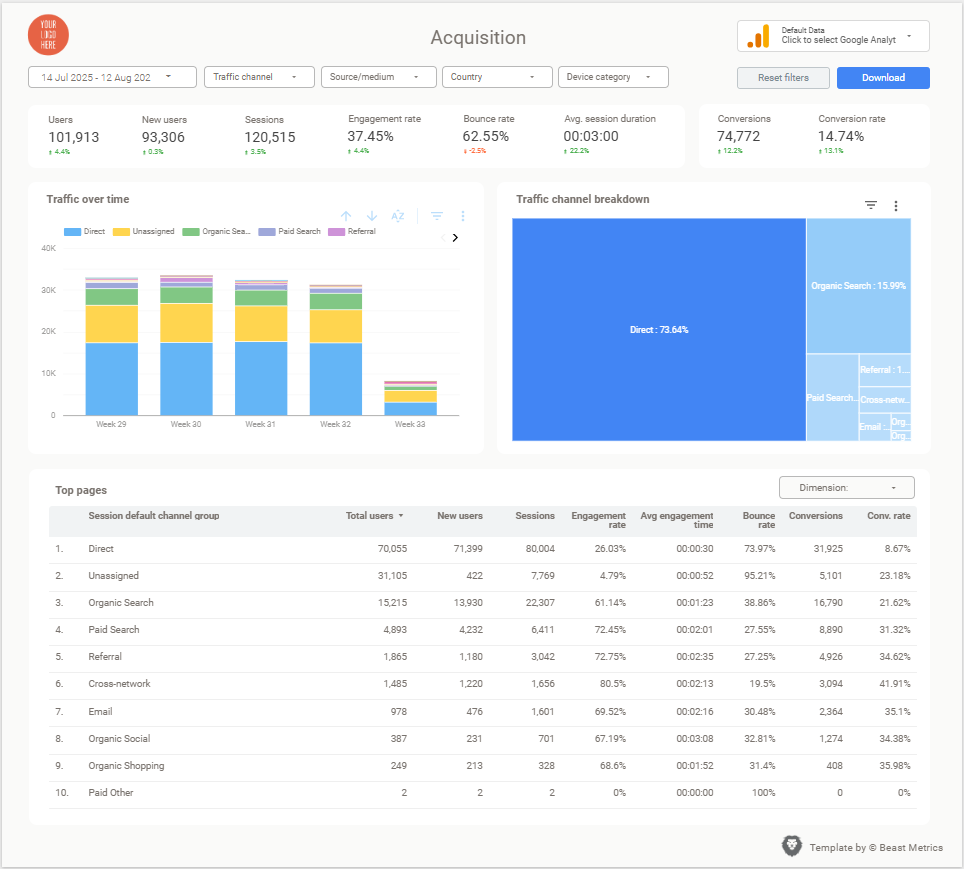
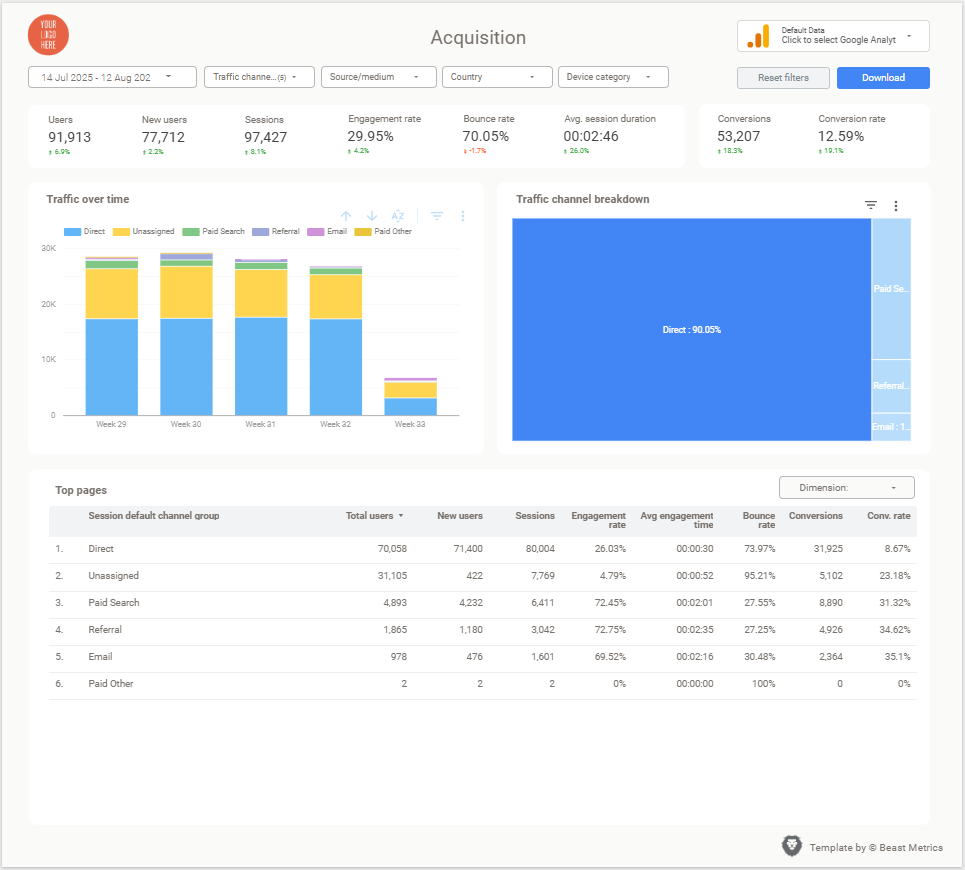
Tracks: users, sessions, engagement rate, traffic by channel, landing pages, devices, locations, and key events such as form submissions and demo requests.
Best for: B2B, SaaS, services and content sites where success is a lead, not a purchase.
Data source: GA4, through Google’s free connector.
Options: the official Google Analytics templates cover the basics. The Beast Metrics GA4 Looker Studio Template (Non-Ecommerce) is a paid, client-ready option with overview, engagement, acquisition, audience and content sections. To build your own, see our GA4 Looker Studio dashboard guide.
Check: GA4 now calls important actions “key events” and keeps “conversions” for ad campaign measurement (Google Analytics Help). Make sure the template reports on the key events you care about.
2. GA4 ecommerce dashboard
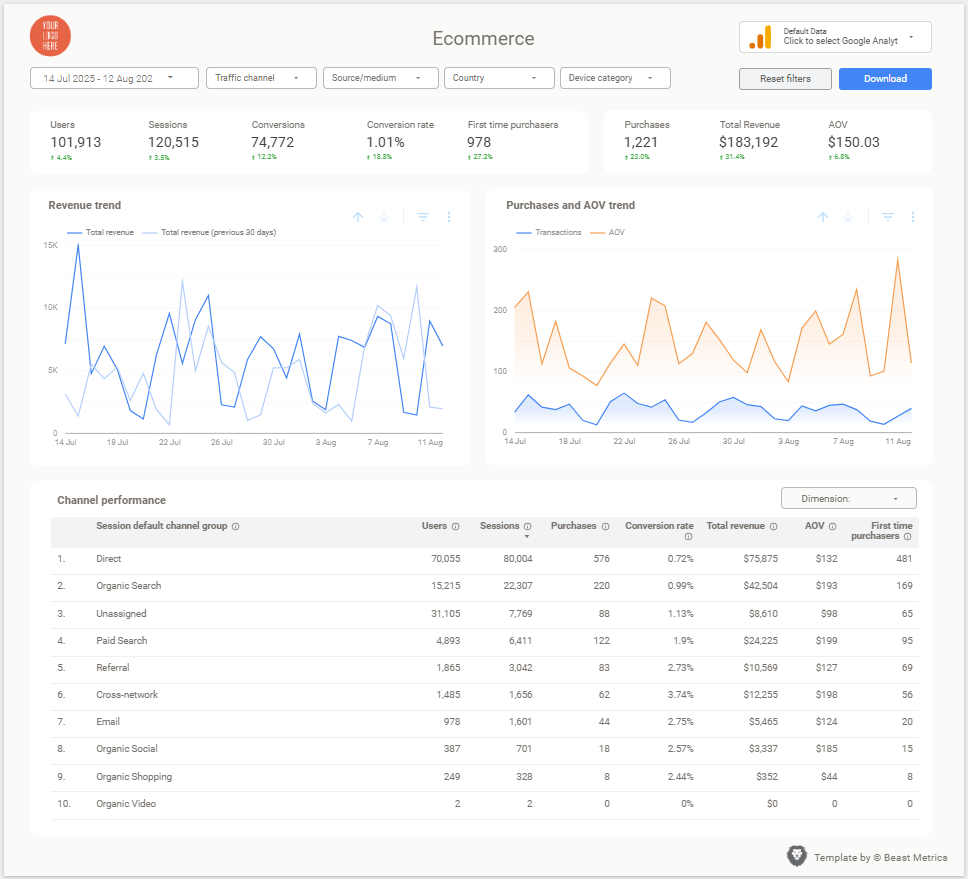
Tracks: revenue, purchases, average order value, conversion rate, product performance, the checkout funnel, and revenue by channel.
Best for: online stores on any platform that sends ecommerce events to GA4.
Data source: GA4 with the standard ecommerce events (view_item, add_to_cart, begin_checkout, purchase). Without them, no template can fill the funnel charts.
Options: the free Google Analytics templates are not built around a store’s funnel. Coupler.io publishes free Shopify and WooCommerce dashboards that use its connector. The Beast Metrics GA4 Looker Studio Template (Ecommerce) is a paid option built on GA4 alone. More in our ecommerce template guide.
3. SEO dashboard (Google Search Console)
Tracks: clicks, impressions, CTR and average position by query, page, country and device, over time.
Best for: SEOs, content teams and agencies.
Data source: Search Console, through Google’s free connector. It has two tables, Site Impression and URL Impression, and one data source can only use one of them (Google: Connect to Search Console), so good templates connect both. Google also leaves out some rare queries for privacy, so query totals will not match page totals exactly.
Options: the free official Search Console template is fine for a single site. The Beast Metrics All-in-One Google Search Console Template adds query, page, country and device, and trend pages plus opportunity filters. See also our Search Console dashboard and SEO dashboard template guides.
Views worth having: high-impression, low-CTR queries (candidates for better titles) and pages sitting around positions 8 to 20.
4. Google Ads dashboard
Tracks: spend, clicks, CTR, CPC, conversions, cost per conversion, conversion value and ROAS by campaign, ad group, keyword, search term, device and location.
Best for: PPC managers and agencies with weekly or monthly reporting.
Data source: Google Ads, through Google’s free connector.
Options: the official Google Ads template gives a simple overview. The Beast Metrics Google Ads Template adds campaign, keyword and search term, creative, audience and time pages across Search, Shopping, Display, Video and Performance Max. Our Google Ads report template guide and Google Ads KPIs post cover what to include.
5. Meta Ads dashboard (Facebook and Instagram)
Tracks: spend, reach, impressions, clicks, CTR, CPC, results, cost per result, purchase value and ROAS by campaign, ad set, ad, placement and demographics.
Best for: paid social teams, ecommerce brands and agencies.
Data source: this is where most people get stuck. Google does not list a Meta Ads connector among the connectors it builds (Google: Available connectors), so you need a partner connector or a scheduled export to Google Sheets. Most partner connectors are paid beyond a free trial or free tier, so budget for that.
Options: connector vendors publish free Meta Ads templates for their own connectors. The Beast Metrics Meta Ads Template is a paid option with campaign, Facebook vs Instagram, location, demographic and trend pages. Setup is covered in our Facebook Ads dashboard template guide.
6. Cross-channel paid media dashboard
Tracks: spend, conversions, CPA and ROAS side by side for Google Ads, Meta, LinkedIn, TikTok, Microsoft Ads and others.
Best for: teams running ads on three or more platforms who want one weekly view.
Data source: one connector per platform, or one vendor connector that covers several. Platforms count conversions differently, so a good template labels each channel clearly instead of adding everything into one total.
Options: start with connector vendor galleries, since their templates already combine their connectors. We do not sell one; a template for your exact channel mix is usually a custom build.
7. All-in-one website dashboard (GA4, Search Console and Google Ads)
Tracks: an executive overview across all three sources, then acquisition, content, organic queries, Google Ads campaigns, devices and trends.
Best for: marketing leads and agencies who want one monthly report per site instead of three.
Data source: GA4, Search Console and Google Ads, all free Google connectors.
Options: you can combine pages from the free official templates yourself, though matching styles and date controls takes time. The Beast Metrics Ultimate Website Dashboard is our pre-built version with seven sections.
8. Google Business Profile dashboard (local SEO)
Tracks: profile impressions on Google Search and Maps, calls, direction requests, website clicks, bookings where relevant, the search keywords that showed your profile, and per-location comparisons.
Best for: local businesses, multi-location brands and agencies managing profiles.
Data source: Google does not list its own Business Profile connector, so you need a partner connector that reads from Google’s Business Profile Performance API.
Options: some connector vendors publish free templates for their connectors. The Beast Metrics Google My Business Template (Google My Business is the former name of Business Profile) is a paid option with overview, location, day-of-week, action-rate and search keyword pages.
9. YouTube channel dashboard
Tracks: a good one covers views, watch time, average view duration, subscribers gained and lost, likes, comments and shares, top videos, and audience country and device.
Best for: brands and creators reporting on video alongside other channels, or sharing results without giving out YouTube Studio access.
Data source: YouTube Analytics, through Google’s free connector, for channels you own or content owner accounts you manage.
Options: we do not sell a YouTube template. The free YouTube Analytics templates in Google’s gallery are where we would start. YouTube ad spend and conversions live in Google Ads, so report those in your Google Ads template.
10. Lead generation and CRM dashboard
Tracks: leads by channel, cost per lead, lead-to-customer rates, pipeline value, and revenue by original source.
Best for: B2B marketers who need to show what happens after the form fill.
Data source: GA4 or your ad platforms, plus your CRM (HubSpot, Salesforce, Pipedrive) through a partner connector or an export to Sheets or BigQuery. The hard part is a shared field, such as UTM values stored on the contact record, that joins the two.
Options: Coupler.io and Windsor.ai publish free HubSpot and Salesforce templates for their connectors. A simpler first step is the GA4 Non-Ecommerce template with lead key events set up, adding CRM data later.
Also worth a look: email marketing templates for Mailchimp or Klaviyo (Coupler.io has both) and organic social templates (Catchr and Dataslayer include them). Both need a partner connector.
Free vs paid Looker Studio templates
- Free official templates cost nothing and use free Google connectors, but they are usually short and generic. Good for learning, internal use or a single site.
- Free vendor templates are often well built, but the connector for Meta, TikTok, LinkedIn or a CRM usually is not free.
- Paid templates save build time with more pages, pre-built filters and client-ready styling. Check which connector a paid template assumes, or you may end up paying twice.
A simple rule: if you report on one Google source for yourself, start free. If you send the same report to clients or leadership every month, the saved build time is usually worth paying for. We go deeper in free vs paid Looker Studio templates.
How to choose a Looker Studio template: a checklist
- Start from your questions. List the three to five questions the report must answer, and rule out templates that cannot answer them.
- Confirm the connector. Google’s connectors for GA4, Google Ads, Search Console, YouTube Analytics, Sheets and BigQuery are free. Meta Ads, Business Profile, TikTok, LinkedIn and CRMs need a partner connector.
- Match your tracking. Ecommerce templates need GA4 ecommerce events. Lead gen templates need your forms set up as key events.
- Click through every page in view mode, and test the date range and filters.
- Watch the chart count. Heavy pages load slowly, and GA4 reports can hit Google Analytics API quota limits when a page sends many requests at once (GA4 Data API quotas).
- Get an editable copy, not a view-only link.
- Check it is current: GA4 key events, and nothing left over from Universal Analytics goals.
- Agencies: test reuse. You should be able to copy it per client and swap the data source in minutes. If clients read reports on their phones, check it there too (see mobile-friendly dashboards).
How to use a Looker Studio template (step by step)
Option A: a template from the official gallery
- In Data Studio, open the Template Gallery from the home page and pick a template.
- Click Use my own data in the top right. If the template has several data sources, click Replace data next to each one.
- Pick one of My data sources, or choose your account (for example, a GA4 property) and click Add.
- Click Edit and share to save it as your own report. You cannot edit or share a template until you do.
An orange dot next to Add data means you only have view access to the default data source. Replace it with one you fully control (a green dot), or your copy will show errors (Google: Create a report from a template).
Option B: make a copy of a shared or purchased template
- Open the report, click the More options menu (three dots, top right) and choose Make a copy.
- The dialog lists the original data sources on the left. On the right, choose your own data source for each one, or create a new one.
- Click Create report. The copy keeps every page, chart, filter and style.
Copying does not bring over the original data sources or any Google Analytics measurement ID used to track report views. Report owners can also turn off copying in the sharing settings.
Then make it yours
- Check every chart. Blank charts usually mean a missing event, a different field name, or a filter that does not match your data.
- Brand it. In Theme and layout, pick a theme or click Customize. Extract theme from image builds a theme from your logo (Google: Themes). Then swap the header logo. Our post on professional-looking dashboards has more design tips.
- Trim and extend. Remove charts you will not use, add calculated fields for your KPIs, and set the default date range.
- Share and schedule. Share with view access, and use Share then Schedule delivery to email it weekly, monthly or on a custom schedule (Google: Schedule report delivery).
Agencies should repeat Option B for each client, so every report connects only to that client’s accounts. Our client reporting dashboard guide covers how to structure that.
Google Data Studio templates: same thing, different name
If you searched for “Google Data Studio templates”, you are looking for the same product. It has had three names:
- Google Data Studio until October 2022.
- Looker Studio from October 12, 2022.
- Data Studio again from April 2026. Google announced it on April 11, and it went live on April 16, 2026 (Data Studio release notes). The paid tier is now Data Studio Pro.
Google says existing reports, data sources and users moved over with no action needed, so templates under any of these names work the same way. For the paid tier, see our Looker Studio Pro pricing guide. For Google’s enterprise BI product, see Looker vs Looker Studio.
Where to find good Looker Studio templates
- Official: the Template Gallery on the Data Studio home page, and the Data Studio Report Gallery for featured, marketing and community reports. The old lookerstudio.google.com/gallery address now redirects there.
- Connector vendors: Windsor.ai (60+ free templates), Dataslayer, Catchr, Coupler.io and Porter Metrics publish free galleries built around their connectors.
- Paid: Beast Metrics templates for GA4 (ecommerce and non-ecommerce), Google Ads, Meta Ads, Search Console, Google Business Profile, plus an all-in-one website dashboard. Each comes as an editable copy you connect to your own accounts.
To see finished reports before you choose, browse our Looker Studio dashboard examples.
Bottom line
Choose by the job and the data source, not the screenshots. For a single Google source (GA4, Search Console, Google Ads or YouTube), start with the free official template and move to a paid one when you need more depth or client-ready styling. For Meta Ads, Business Profile or CRM data, work out the connector cost first. Whichever you pick, copy it, connect your own data, and check every chart before anyone else sees it.