TL;DR
- Looker Studio AI is Google’s Gemini-powered feature set inside Looker Studio Pro, covering natural-language querying, automated formula creation, and AI-generated Google Slides exports.
- Google Cloud data shows Gemini’s semantic layer grounding reduces data errors in AI-generated queries by up to two-thirds compared to ungrounded AI tools.
- The full feature set requires BigQuery as the underlying data layer. Agencies on fragmented direct-connector stacks will see degraded results.
- A single analyst recovering three hours per week recovers $1,200 to $1,800 in monthly billable capacity. The Pro subscription is $9 per user per month.
- Limitations matter: Gemini has no session memory, AI outputs require human review, and some features remain in public preview as of mid-2026.
Quick Answer:
Looker Studio AI is Google’s suite of Gemini-powered features inside Looker Studio Pro. It enables natural-language data queries, automated calculated field creation, and AI-written Google Slides exports from live dashboards.
What Is Looker Studio AI, and How Is It Different From Standard Looker Studio?
Looker Studio AI is the set of Gemini-powered capabilities available exclusively inside Looker Studio Pro. These features are not available on the free Looker Studio tier and require an active Pro subscription to access. The AI layer sits on top of your existing dashboards and data connections, letting users query data in plain English, generate calculated metrics automatically, and export AI-narrated presentations without manual slide-building.
Three product names matter here, and they are not interchangeable. Looker is Google Cloud’s enterprise business intelligence platform built for large-scale semantic data modeling. Looker Studio is a separate, free Google product designed for dashboarding and reporting, used primarily by marketing teams and agencies. The Looker vs Looker Studio guide covers every pricing and feature distinction between the two. Looker Studio AI is the Gemini integration layer embedded inside the Pro tier of Looker Studio specifically.
Before this integration, generating a new calculated metric required someone who understood SQL or Looker’s expression syntax. Now, an account manager can type “show me cost per acquisition by channel for last quarter” and get a working chart.
According to Google Cloud, Gemini in Looker reduces data errors in AI-generated queries by as much as two-thirds by grounding its responses in the Looker semantic layer, a predefined data model that enforces consistent metric definitions across every query. That grounding is what separates Looker Gemini from a general-purpose AI tool running against a raw spreadsheet export.
What Are the Core Looker Studio AI Features, and How Do They Work?
Looker Studio AI covers three primary capabilities: Conversational Analytics, the Formula Assistant, and Automated Slide Generation. Each addresses a specific, recurring bottleneck in agency reporting.
Does Conversational Analytics Actually Work in a Live Client Meeting?
Conversational Analytics lets users type natural-language questions into a Looker Studio dashboard and receive charts, tables, or written summaries in return. It works in real time, supports multi-turn follow-up questions, and queries your actual connected data rather than generic AI training data.
The clearest payoff is the live client review. An unexpected question arrives: “What was our ROAS on branded search in October compared to Q3?” Without Conversational Analytics, that question gets logged for the analyst and answered in a follow-up email. With it, the account manager has a chart on screen in ten seconds.
For agencies managing client reporting dashboards across multiple accounts, answering questions live without analyst escalation is one of the most defensible service upgrades available right now.
Because the feature is grounded in LookML, Gemini can only reference fields and relationships already defined in the data model. That constraint is the reliability mechanism. It prevents the AI from fabricating metrics that do not exist in your data.
From working directly with agency reporting teams, the biggest operational drain is rarely the original dashboard build. It is the constant stream of one-off questions between reporting cycles, each one requiring analyst time to answer. Conversational Analytics absorbs that demand without adding headcount.
How Does the Formula Assistant Remove the RegEx and SQL Bottleneck?
The Formula Assistant converts plain-English descriptions into ready-to-use calculated fields inside Looker Studio. You describe the metric, Gemini writes the syntax.
Practical example: typing “calculate profit margin as revenue minus cost divided by revenue” produces a working calculated field. More advanced uses include RegEx patterns for channel grouping (consolidating Meta, TikTok, and LinkedIn under one Paid Social label), conditional CASE statements for campaign categorization, and blended logic across multiple data sources.
End users report AI saves 3.6 hours per week in document workflows, per Foxit’s 2026 research, though review time offsets most gains. The Formula Assistant targets exactly that task profile. Teams in the BeastMetrics survey of 247 marketing teams confirmed similar results, reporting they could save hours on marketing reports once formula automation was integrated into their workflow.
One non-negotiable: always verify AI-generated formulas before publishing to clients. Gemini produces plausible outputs, but complex data models with edge cases can surface errors that look correct until someone checks the underlying calculation. Human review is not optional.
Can Looker Studio AI Build a Client Presentation Automatically?
Yes. The Automated Slide Generation feature exports a Looker Studio dashboard directly into Google Slides, with AI-written narrative summaries attached to each visual.
The output is a first draft. Gemini interprets each chart, identifies trend direction, and flags notable changes in plain language. A human reviewer still adds the strategic “so what” and adjusts tone to match each client’s communication style. What changes for agencies is where analyst time goes.
A working deck that previously took two to three hours to build from scratch is ready in under five minutes. For agencies looking to build a full end-to-end workflow around this, the guide to automated marketing reports covers the complete setup.
One practical constraint: exported slides use Google’s default Slides formatting. Agencies with heavily branded client decks will need to apply brand templates after export. Custom fonts, colors, and logo placements are not applied automatically.
How Does Looker Studio AI Compare to Power BI Copilot and Tableau Einstein AI?
| Feature | Looker Studio AI (Pro) | Tableau (Einstein AI) | Power BI (Copilot) |
|---|---|---|---|
| Natural language querying | Yes | Yes | Yes |
| Grounded in semantic data model | Yes (LookML) | Partial | Yes (Tabular Model) |
| Automated slide or deck export | Yes (Google Slides) | No native export | Limited (PowerPoint) |
| Formula generation from plain English | Yes | Limited | Yes |
| AI included in base subscription | Yes (Pro tier) | No, add-on cost | No, Copilot add-on |
| Base plan cost per user per month | $9 (Pro) | $70+ (Creator) | $10 (Pro) |
| Native Google ecosystem integration | Yes | Third-party connectors only | Limited |
| White-label or client portal access | No native white-label | Yes (Tableau Cloud) | Limited |
For agencies operating inside Google’s ecosystem (Google Ads, GA4, Google Workspace, BigQuery), Looker Studio AI offers the lowest-friction path to AI-assisted reporting. For a broader view of where Looker Studio sits against other AI tools for data visualization, including Power BI and Tableau, the guide covers the full landscape with pricing context.
Tableau’s clear advantage remains white-labeling and client portal capability. Power BI Copilot is a stronger fit for agencies operating within the Microsoft stack, but requires a separate add-on subscription. For Google-stack agencies, the cost and integration comparison is not close.
What Does Rolling Out Looker Studio AI Actually Require?
Most agencies that fail to get value from Looker Studio AI skip Phase 1 and jump straight to enabling features. That is the core mistake.
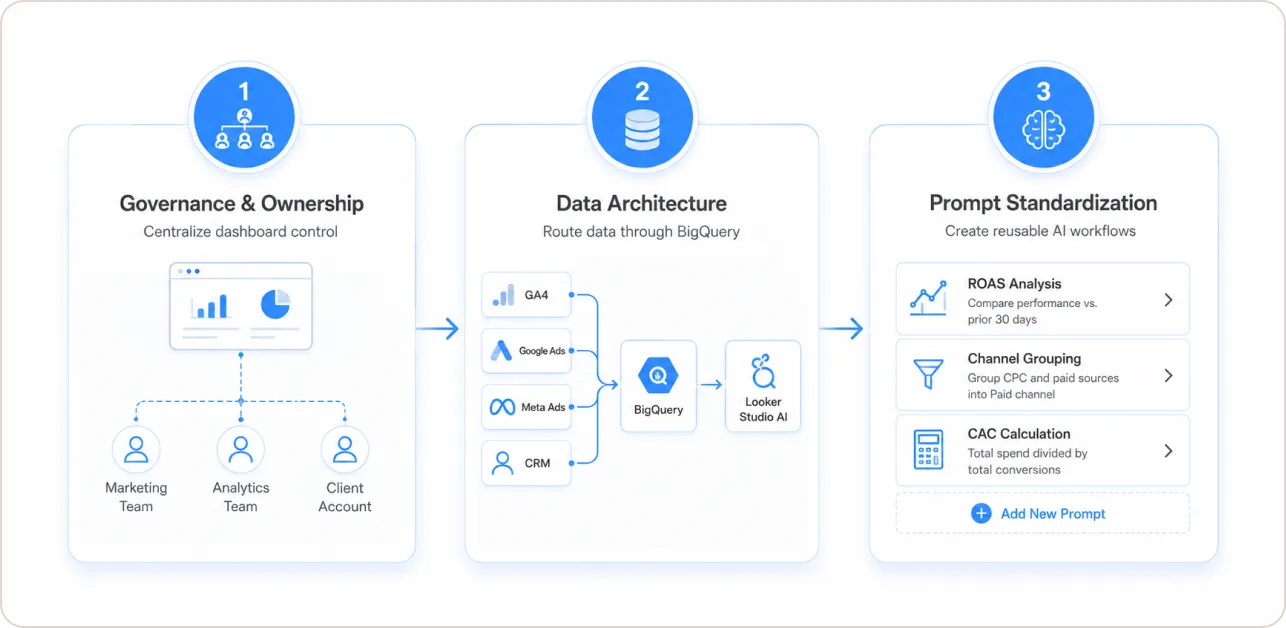
Phase 1: Governance and ownership consolidation. Most agencies carry a silent risk: dashboards scattered across individual team members’ personal Google accounts. When someone leaves, the dashboard becomes inaccessible. Looker Studio Pro solves this by centralizing all report ownership inside a Google Cloud organizational project. Every dashboard is owned by the organization, not the individual creator. This step has nothing to do with AI. It is a basic reporting infrastructure that should happen first, regardless.
Phase 2: Data architecture. Conversational Analytics and the Formula Assistant perform best when data flows through BigQuery rather than direct connector pulls. Agencies should audit which data sources (Meta Ads, Google Ads, GA4, CRM exports) need to be routed into BigQuery to unlock the full Gemini feature set. For teams already using a GA4 dashboard template or a Google Ads Looker Studio template, connecting those data sources to BigQuery is the logical next step.
Phase 3: Prompt standardization. A shared prompt library is what separates consistent results from ad hoc ones. Three prompts worth standardizing immediately: “Summarize campaign performance versus the prior 30 days, flagging any channel where ROAS dropped more than 15%.” “Group all sources containing ‘cpc’ or ‘paid’ into a single Paid channel label.” “Calculate customer acquisition cost as total spend divided by total conversions.” Document these, train every account manager on them, and adoption moves from occasional to systematic.
Is Looker Studio AI Worth $9 Per User Per Month for Agencies?
The billable-hour math is direct. An analyst recovering three hours per week through AI-assisted formula creation, slide drafting, and conversational queries recovers 12 hours per month. At $100 to $150 per hour, that is $1,200 to $1,800 in recovered billable capacity per analyst, per month. The Pro subscription is $9. For a full breakdown of what is free, what requires Pro, and what hidden costs to watch for, the Looker Studio Pro pricing breakdown covers every tier in detail.
The more durable argument is service-level differentiation. Agencies that answer unexpected client questions live, deliver AI-narrated decks within hours of a campaign ending, and offer clients self-service data access are delivering something structurally different from agencies still running manual monthly reports.
Gartner’s 2024 report highlights that conversational analytics and natural language interfaces are now table stakes for enterprise BI platforms, shifting from differentiators to expected features amid GenAI advancements. Agencies without these risk falling behind client demands for accessible, augmented insights. This aligns with the report’s evaluation of 20 vendors on execution and vision, where leaders like Microsoft, Tableau, and Google Cloud excel in democratizing data via AI-driven interfaces.
What Are the Limitations Agencies Must Understand Before Switching On Looker Studio AI?
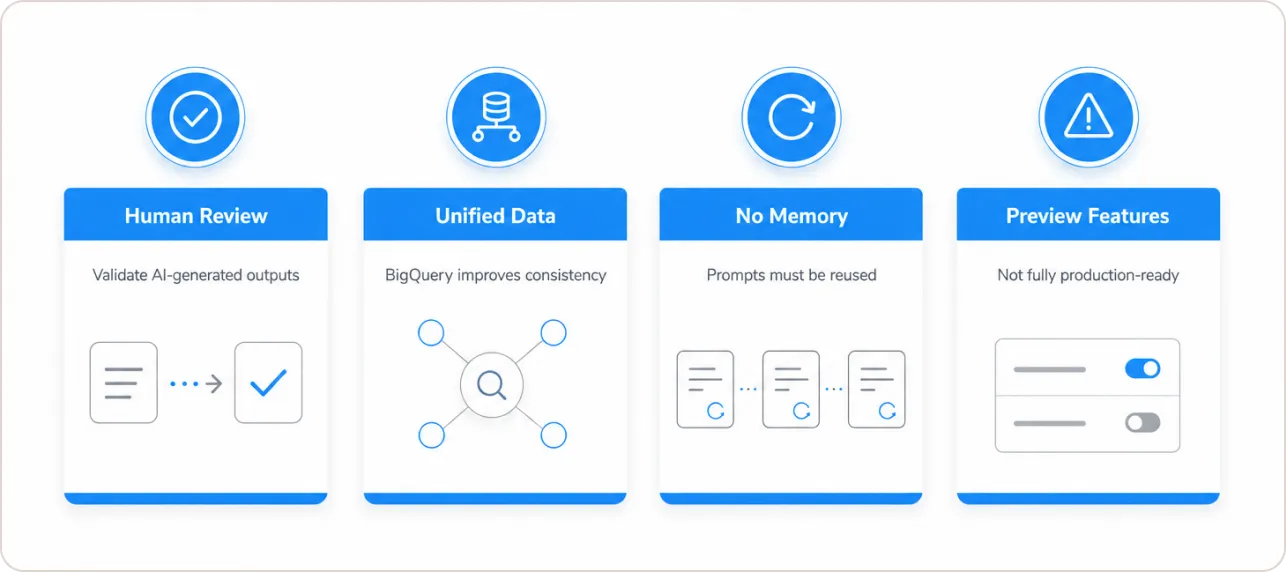
Four constraints matter operationally, and all four are underreported.
AI outputs require human review. Google’s own documentation states Gemini can produce results that are “plausible but incorrect.” Every AI-generated formula, slide narrative, and conversationally built chart needs a human checkpoint before reaching a client. This is not optional.
Fragmented data stacks limit performance. Conversational Analytics works reliably only when data is unified inside BigQuery with a well-defined LookML semantic model. Agencies pulling from Meta, TikTok, HubSpot, and GA4 simultaneously through direct connectors, without a unified data layer, will get inconsistent results. The AI amplifies the quality of the data model underneath it, not the other way around.
No session memory. Gemini does not retain context between Looker Studio sessions. Every conversation starts from zero. For context-heavy recurring analyses, document your analytical framing as a reusable prompt and paste it at the start of each session. Expecting the AI to remember previous instructions will consistently disappoint.
Some features remain in preview. As of mid-2026, not all Gemini capabilities inside Looker Studio Pro have reached general availability. Check Google Cloud release notes before committing any preview feature to a production client workflow.
Expert Quote
“Our own internal testing has shown that Looker’s semantic layer reduces data errors in gen AI natural language queries by as much as two-thirds.” – Google Cloud Blog, May 2025 (Source).
What Should Agencies Do Next?
The agencies that extract real value from Looker Studio AI are those that build the infrastructure before enabling the features. Consolidate dashboard ownership first. Route core data sources into BigQuery in seconds. Standardize a prompt library third. AI tools do not fix fragmented data. They amplify whatever structure already exists underneath them.
For context on the reporting baseline the AI layer builds on, the guide to how top agencies use data to win more clients covers what production-ready Looker Studio reporting looks like before you add Gemini on top.
The tools are available now. The question is whether your data infrastructure is built to use them reliably.