Key Highlights:
- Transform 6-hour manual reporting sessions into 1-hour automated processes
- Eliminate 90% of data entry errors through direct API connections
- Generate professional client reports that update in real-time automatically
- Calculate ROI with concrete time savings of $1,500+ monthly for marketing teams
- Scale reporting across multiple clients without additional manual work
- Access professional dashboard templates that work immediately out-of-the-box
AI Overview:
Automated marketing reports use API connections to pull data from platforms like Google Ads and Analytics, automatically generating real-time dashboards that save 20+ hours monthly and eliminate manual reporting tasks.
Stop drowning in spreadsheets every Sunday night – there’s a smarter way to handle your marketing reports.
Last Sunday, I spent six hours manually copying data from Google Analytics, Facebook Ads, and Google Ads into spreadsheets for Monday’s client presentation.
That frustration led me to discover automated marketing reports – a game-changing approach that transformed my entire marketing automation reporting workflow.
If you’re tired of spending evenings wrestling with data, this guide will show you exactly how to implement marketing reporting automation and reclaim 20+ hours monthly.
The Hidden Cost of Manual Marketing Reporting
Time Investment That’s Killing Your Productivity
The average marketing professional spends 6 hours weekly on manual reporting tasks – time that could be saved with automated marketing reports.
Here’s the typical breakdown:
- 2 hours gathering data from different platforms (Google Analytics, Facebook Ads, Google Ads)
- 2 hours creating visualizations and charts in spreadsheets
- 1 hour formatting presentations and making them client-ready
- 1 hour fielding client questions about outdated or inconsistent information
According to HubSpot’s 2025 State of Marketing Report, marketers spend 21% of their time on administrative tasks rather than strategic work.
At an average marketing salary of $75 per hour, those 24 hours monthly cost $1,800 in labor alone – not counting the opportunity cost of delayed optimizations and missed strategic insights that marketing automation reporting could prevent.
Beyond Time: The Real Business Impact
Manual reporting creates a cascade of problems that extend far beyond time management.
Data quality issues are significant, leading to misguided campaign decisions based on incorrect metrics.
The hidden costs of manual reporting include:
- Data accuracy issues – Manual copying leads to calculation errors and mistyped numbers
- Delayed decision-making – Week-old data prevents timely campaign optimizations
- Missed opportunities – Performance drops go unnoticed until the next reporting cycle
- Team burnout – Repetitive tasks reduce morale and job satisfaction
- Client dissatisfaction – Inconsistent or outdated reports damage professional credibility
- Scalability limitations – Manual processes don’t grow efficiently with business expansion
I’ve seen campaigns hemorrhage budget for days simply because the reporting lag prevented teams from catching performance drops early.
The True Cost of Manual Marketing Reporting
At $75/hour, spending 24 hours monthly on manual reports costs $1,800 in labor alone. Add delayed optimizations, missed opportunities, and team frustration – marketing automation reporting typically pays for itself within the first month through automated marketing reports implementation.
What Are Automated Marketing Reports?
Understanding Marketing Automation Reporting
Automated marketing reports eliminate manual data gathering by connecting directly to your marketing platforms through APIs.
Instead of logging into five different dashboards and copying metrics into spreadsheets, marketing reporting automation pulls data automatically, standardizes formatting, and presents everything in real-time automated reports.
This reporting marketing automation performance approach means your Google Ads spend, Facebook conversion rates, and GA4 traffic data update every hour without manual intervention.
When campaign performance shifts, your marketing automation report shows it immediately rather than discovering it during next week’s reporting session.
The Five-Step Automation Process
Here’s how marketing automation reporting actually works behind the scenes to create effective automated marketing reports:
- Data Collection: APIs automatically pull metrics from platforms like Google Ads, Facebook Ads, Google Analytics, and Search Console for marketing reporting automation
- Data Integration: Information gets cleaned, standardized, and merged into unified datasets for automated report generation
- Visualization: Charts, graphs, and scorecards update automatically with fresh data in your marketing automation report
- Scheduling: Automated marketing reports generate and deliver on predetermined schedules
- Alerts: Automated notifications trigger when metrics hit predetermined thresholds in your reporting marketing automation performance dashboard
Types of Marketing Reports to Automate
Campaign Performance Reports
- Multi-channel campaign tracking becomes effortless when you implement automated marketing reports that consolidate data automatically.
- Rather than manually calculating ROI across Google Ads, Facebook, and email campaigns, marketing automation reporting systems compile everything into unified dashboards showing cost-per-acquisition, lifetime value, and attribution data in real-time automated reports.
- A/B test results compilation happens automatically too with proper marketing reporting automation.
- Instead of waiting until the campaign ends to analyze performance, you can monitor test metrics continuously through your marketing automation report and make optimization decisions based on statistical significance rather than gut feelings.
Client Monthly Reports
- Executive summary automation transforms client communication from a time-consuming chore into a professional advantage through automated marketing reports.
- Marketing automation report systems can generate branded monthly summaries that highlight key wins, explain performance changes, and provide strategic recommendations – all without manual formatting through marketing reporting automation.
- Professional automated report generation eliminates the embarrassment of last-minute client presentations.
- When your marketing automation reporting dashboards update automatically, you’re always prepared for impromptu client calls or unexpected board meetings with current reporting marketing automation performance data.
Lead Generation Reports
- Funnel performance tracking becomes dramatically more accurate when automated systems monitor every touchpoint from initial awareness through closed deals.
- Instead of manually connecting marketing qualified leads to revenue outcomes, marketing reporting automation shows the complete customer journey with proper attribution through comprehensive reporting marketing automation performance analysis.
- Lead quality scoring integration means your reports don’t just show quantity metrics like form submissions, but quality indicators like lead-to-customer conversion rates and average deal sizes by source.
- Advanced marketing automation reporting systems can track lead progression through each funnel stage automatically.
ROI and Attribution Reports
- Multi-touch attribution modeling requires sophisticated data processing that’s nearly impossible to manage manually.
- Marketing automation reporting systems can track customer interactions across email, social media, paid search, and organic channels to show which marketing activities actually drive revenue through detailed reporting marketing automation performance analytics.
- Customer lifetime value tracking becomes practical at scale when marketing reporting automation handles the complex calculations of retention rates, repeat purchase behavior, and long-term profitability by acquisition channel automatically.
Step-by-Step Automation Setup Guide
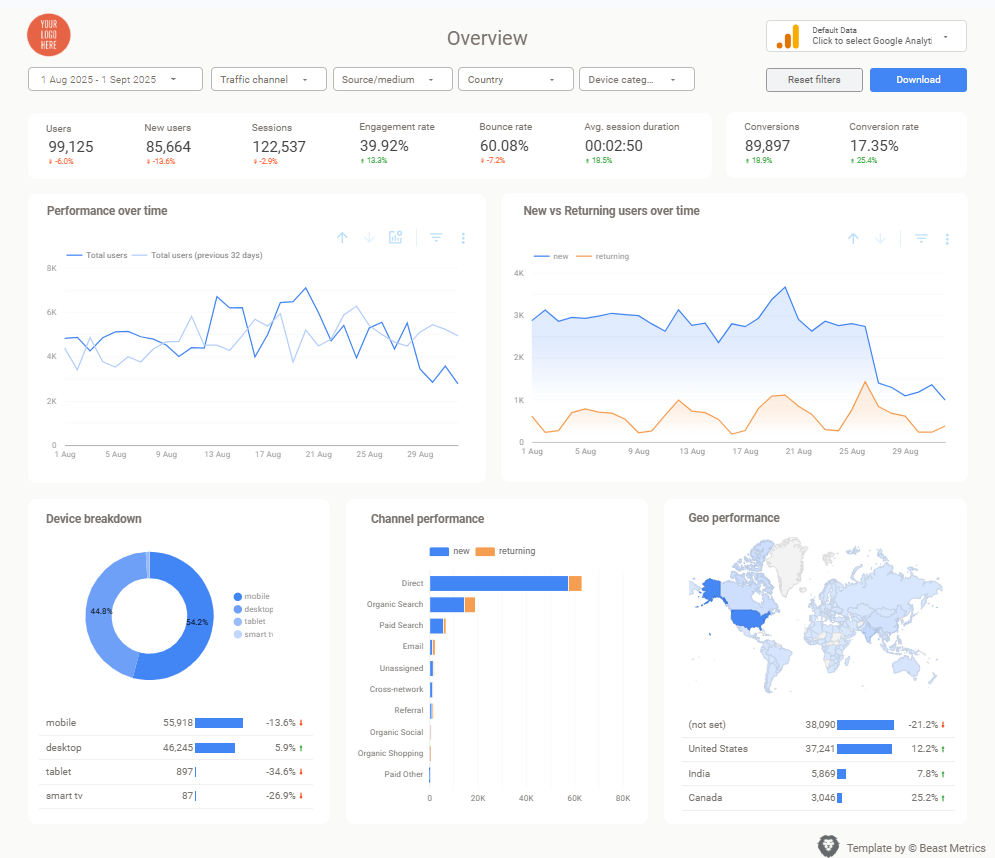
Step 1: Audit Your Current Reporting Process
Document exactly how you currently create reports for effective marketing reporting automation planning.
Track the time spent on each task: data gathering (usually 2-3 hours), visualization creation (1-2 hours), formatting (30-60 minutes), and quality checking (30 minutes).
This baseline helps measure reporting marketing automation performance improvements after implementation.
Identify your most time-consuming reports first to prioritize marketing automation reporting efforts.
Focus automation efforts on weekly client dashboards or monthly executive summaries that require the most manual work. These represent the biggest time-saving opportunities when implementing comprehensive marketing reporting automation systems.
Step 2: Choose Your Automation Platform
Google Looker Studio (formerly Data Studio) offers the most cost-effective starting point for implementing automated marketing reports.
The platform connects natively to Google Analytics, Google Ads, Search Console, and YouTube Analytics without additional costs, making marketing automation reporting accessible to any budget.
For platforms like Facebook Ads, email platforms, and other third-party integrations, consider solutions like Supermetrics or Zapier to bridge data gaps.
Evaluate platforms based on your specific data sources and budget constraints rather than feature lists when building your marketing reporting automation strategy.
Marketing Automation Platforms Comparison
| Platform | Best For | Pros | Cons |
|---|---|---|---|
| Google Looker Studio | Beginners, Google ecosystem | Free, native integrations, easy setup | Limited third-party connectors |
| Supermetrics | Multi-platform reporting | 100+ connectors, reliable data sync | Monthly subscription required |
| Zapier | Simple automations | No-code setup, wide app support | Limited reporting features |
| Power BI | Enterprise teams | Advanced analytics, Microsoft integration | Steep learning curve |
Step 3: Connect Your Data Sources
API integration setup requires careful attention to data permissions and authentication for effective marketing automation reporting.
Start with Google products since they offer the most straightforward connection process for automated marketing reports. For Google Analytics 4, ensure you’re connecting the correct property and have appropriate view permissions.
Data mapping becomes crucial when consolidating metrics from different platforms into your marketing automation report.
Campaign names, audience segments, and conversion events need consistent naming conventions across platforms to ensure accurate automated report generation through marketing reporting automation.
[Visual placeholder: Screenshot showing the data connection interface in Looker Studio with multiple connected sources]
Step 4: Design and Schedule Your Reports
Template customization should prioritize clarity over complexity when setting up marketing automation reporting systems.
Focus on 5-7 key metrics that directly impact business objectives: cost per acquisition, return on ad spend, conversion rates, lead quality scores, and customer lifetime value in your reporting marketing automation performance dashboards.
Automated scheduling eliminates the last-minute scramble before client meetings through strategic marketing reporting automation.
Set up weekly stakeholder reports to deliver every Monday morning and monthly executive summaries to arrive the first business day of each month using marketing automation reporting features.
Step 5: Test and Refine Your Automated Reports
Data accuracy validation requires comparing automated outputs with manual calculations for the first few reporting cycles using marketing automation reporting best practices.
Check metric definitions, date ranges, and filtering logic to ensure consistency with historical reporting methods through thorough reporting marketing automation performance testing.
Performance monitoring should include both technical reliability (data freshness, connection stability) and business relevance (metric accuracy, stakeholder satisfaction) when evaluating marketing reporting automation success.
Adjust dashboards based on actual usage patterns rather than theoretical requirements to optimize your reporting marketing automation performance over time.
Advanced Automation Strategies
Conditional Reporting and Smart Alerts
- Smart alert systems notify you when metrics deviate from expected ranges.
- Set up notifications when cost-per-click increases by 20% or conversion rates drop below historical averages. This proactive approach catches problems before they impact monthly results.
- Exception reporting highlights anomalies automatically rather than requiring manual analysis.
- When campaign performance suddenly changes, automated systems can flag the shift and provide context about potential causes.
Multi-Client Scaling Techniques
- White-label automation allows agencies to create professional dashboards for multiple clients without rebuilding reports from scratch through efficient marketing automation reporting workflows.
- Template duplication and customization streamlines the onboarding process for new client accounts using proven marketing reporting automation strategies.
- Standardized metric definitions across client accounts enable benchmark comparisons and best practice identification when implementing comprehensive reporting marketing automation performance systems.
- When reporting structures remain consistent through marketing automation reporting, you can quickly identify which strategies work across different industries and business models.
Predictive Analytics Integration
- AI-powered forecasting adds strategic value beyond historical reporting.
- Automated systems can project quarterly performance based on current trends, helping stakeholders make informed budget allocation decisions.
- Recommendation engines analyze performance patterns to suggest optimization opportunities.
- Instead of just reporting what happened, advanced automation can indicate what actions might improve future results.
Measuring Your Automation Success
Key Performance Indicators for Automation ROI
Track three essential metrics to measure automation effectiveness: time saved weekly (target: 20+ hours monthly), error reduction percentage (target: 90% fewer mistakes), and stakeholder satisfaction scores (target: 25% improvement in report engagement).
- Time Savings Calculation: If you previously spent 6 hours weekly on manual reporting and automation reduces this to 1 hour weekly, you’ve gained 20 hours monthly. At $75/hour, that represents $1,500 in recovered productivity.
- Error Rate Improvement: Manual data entry typically generates 3-5 errors per report cycle.
Automated systems reduce this to near-zero for data pulling, though validation processes remain important for data interpretation.
Long-term Efficiency Gains
- Compound time savings extend beyond immediate reporting tasks through comprehensive marketing automation reporting.
- Teams with marketing automation systems spend 40% more time on strategic analysis and campaign optimization according to Salesforce research on marketing productivity, demonstrating clear reporting marketing automation performance benefits.
- Client satisfaction improvements often exceed internal efficiency gains when implementing automated marketing reports.
- When stakeholders receive timely, accurate marketing automation report deliverables consistently, it builds trust and creates opportunities for expanded service offerings through superior marketing reporting automation.
Continuous Improvement Framework
- Monthly automation audits should evaluate both technical performance and business value.
- Review data accuracy, connection stability, and stakeholder feedback to identify optimization opportunities.
- Quarterly strategy reviews can expand automation scope based on initial success.
- Start with core reports, then gradually automate campaign analysis, competitor tracking, and predictive modeling as your systems mature.
Common Automation Challenges and Solutions
Data Quality and Consistency Issues
- Platform attribution discrepancies create the most frequent data quality challenges.
- Google Analytics and Facebook Ads often report different conversion numbers due to attribution window differences and tracking methodology variations.
- Solution: Document attribution methodology clearly in automated reports and maintain consistent definitions across platforms. Use automated footnotes to explain discrepancies rather than manual adjustments.
Technical Integration Complexity
- API rate limits and connection failures can disrupt automated reporting schedules.
- Third-party integrations particularly struggle with stability during high-traffic periods or platform updates.
- Solution: Build redundancy into automation workflows with backup data sources and error notifications. Test integration stability regularly and maintain relationships with platform support teams.
What Doesn’t Work: Common Automation Failures
Over-Automation Without Human Oversight:
- One agency I consulted automated everything, including analysis and recommendations.
- The system flagged a 200% conversion rate increase as “excellent performance” when it was actually a tracking error. Always maintain human review for strategic decisions.
Ignoring Data Source Changes:
- A client’s automated reports broke for three weeks when Facebook updated their API without notice.
- The team didn’t realize until a major client meeting. Set up monitoring alerts for data freshness and connection status.
Template Overload:
- Another team created 47 different automated report templates for different clients.
- Managing and updating them became more time-consuming than manual reporting. Stick to 3-5 standardized templates maximum.
Stakeholder Adoption Resistance
- Team members accustomed to manual processes may resist automated reporting due to concerns about accuracy or loss of control over data presentation.
- Solution: Implement automation gradually alongside existing processes. Demonstrate accuracy through parallel reporting periods before fully transitioning to automated systems.
Why Most Automation Projects Fail (And How to Avoid It)
After consulting with dozens of agencies on automation implementations, I’ve identified three critical failure patterns that kill 70% of automation projects before they deliver value.
The “Everything at Once” Trap
Most teams try to automate their entire reporting ecosystem in one massive project.
They connect 15 data sources, build 20 different dashboard views, and set up complex conditional logic – all in week one.
The result? Analysis paralysis, team overwhelm, and systems so complex that nobody understands how to maintain them.
The Fix: Start with one high-impact report. Perfect it completely. Then expand systematically.
The “Set It and Forget It” Myth
Automation isn’t a one-time setup that runs forever without maintenance.
Platforms update APIs, tracking methods change, and business requirements evolve. Yet teams treat automated reports like appliances that should work indefinitely.
I’ve seen reports running for months with broken data connections because nobody established monitoring protocols.
The Fix: Schedule monthly “automation health checks” to verify data accuracy and connection stability.
The “Technical Solution to Human Problems” Fallback
Teams often implement automation to avoid difficult conversations about reporting requirements and stakeholder alignment.
They build elaborate dashboards hoping to satisfy everyone, but end up pleasing no one because the underlying communication issues remain unresolved.
The Fix: Solve people’s problems first. Get crystal clear on what stakeholders actually need before building anything.
The Surprising Hidden Benefit: Team Morale
Everyone focuses on time savings when discussing automation, but the psychological impact on marketing teams might be even more valuable.
Breaking the Sunday Night Dread
- Manual reporting creates a weekly cycle of stress that extends far beyond work hours.
- Team members dread weekends because they know Monday morning means scrambling to pull numbers together. This chronic stress affects sleep, relationships, and job satisfaction.
- When automation eliminates this pressure, teams report feeling genuinely excited about Monday morning client calls instead of anxious.
Shifting From Reactive to Proactive
- Manual reporting keeps teams in constant reactive mode – always catching up on what happened last week instead of planning what should happen next week.
- Automation flips this dynamic completely. When data updates automatically, teams spend their mental energy on strategy, optimization, and innovation rather than data wrestling.
The Pride Factor
- There’s something psychologically powerful about presenting real-time, professional dashboards instead of hastily assembled spreadsheets.
- Team members report feeling more confident in client meetings, more professional in their presentations, and genuinely proud of their deliverables.
- This confidence boost creates a positive feedback loop – better presentations lead to better client relationships, which lead to better business outcomes, which lead to higher team satisfaction.
- The morale improvement often delivers ROI that’s harder to measure but just as valuable as the time savings.
Future-Proofing Your Automated Reports
Emerging Technology Integration
- Machine learning integration will enhance automated reporting with anomaly detection, predictive modeling, and intelligent insights generation.
- Prepare systems for AI enhancement by maintaining clean data structures and comprehensive historical datasets.
- Voice activation and natural language querying represent the next frontier in automated reporting.
- Systems that allow stakeholders to ask questions like “What drove the conversion rate increase last month?” will transform how teams interact with marketing data.
Platform Evolution Considerations
- Marketing platforms continuously update APIs and tracking methodologies.
- Build flexibility into automated systems to accommodate changes in data structures, metric definitions, and attribution models.
- Privacy regulation impacts require ongoing attention to data collection and reporting practices.
Building future-ready automated reports requires the right foundation from the start. Professional Marketing Report templates provide the structured framework needed to adapt quickly as technologies and regulations evolve.